

Spend without an owner
Shared accounts, missing tags and platform costs leave a large slice of the bill that no team will claim, so no team cuts it.
ASCENDING’s AWS FinOps service pairs a FinOps platform with AWS managed service provider engineers for cost audit, cost control and cost optimization: every dollar allocated to an owner, cost spikes flagged before the invoice, and savings our engineers implement with your authorization. FinOps gives finance, engineering and business teams shared, timely data on AWS spend.
The MSP designation validates operational maturity, security practices, and AWS expertise. About the AWS MSP program
Most AWS cost problems are not pricing problems. They are visibility and ownership problems that show up a month late.
Shared accounts, missing tags and platform costs leave a large slice of the bill that no team will claim, so no team cuts it.
A runaway job or a misconfigured deploy runs for weeks before finance sees it, and by then the money is spent.
Recommendations pile up in a dashboard because engineers have no time, and commitments get bought on guesswork.
Three jobs, one platform, and an AWS MSP team that runs the cycle with you every month.
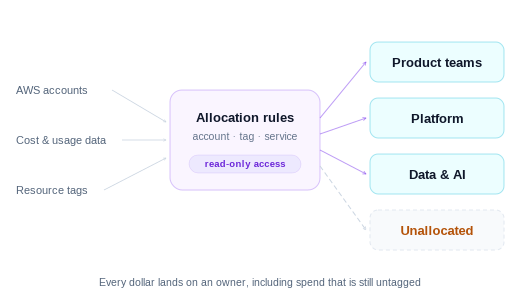
We connect the platform to your AWS cost and usage data with read-only access, then map spend to the way your business is organized, not the way your accounts happen to be laid out.
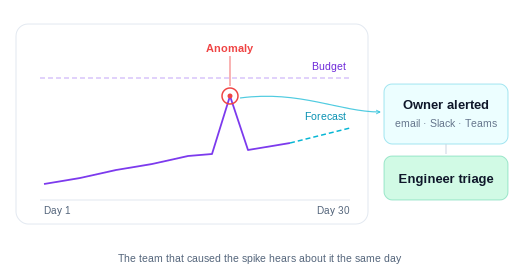
Budgets and forecasts set the expectation. AWS cost anomaly detection watches near real-time usage and alerts the team that owns the spend, so the person who can fix it hears about it first.
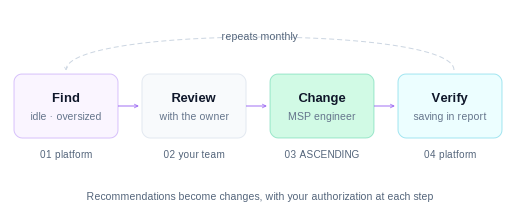
The platform finds the opportunities. Our MSP engineers review them with the resource owner and make the change in your environment, only with your scoped authorization, then confirm the saving in the next report.
FinOps works when every role sees the number it is accountable for, in terms it uses. Each view below is built from the same allocated data.
“Will we land on budget this quarter?”
Forecasts by cost center, chargeback reports that match the invoice, and early warning before a variance reaches the close.
“Is our cloud spend growing faster than the business?”
Spend by product and team, unit cost trends, and a clear record of which savings shipped and what they returned.
“What did my team’s last deploy cost?”
Their own budget and alerts, scoped to their services, plus recommendations they can approve without a spreadsheet hunt.
“How much of the bill is still unallocated?”
Allocation rules, tag coverage, and a monthly review cadence run with our engineers instead of on top of a day job.
“How much should we commit for, and for how long?”
Usage history to size Savings Plans and private pricing commitments, and a view of what is already covered before renewal.
“What does it cost to serve our customers?”
Cost per product or customer to inform pricing and margin decisions, without needing to read an AWS invoice.
Bring your last AWS invoice. We’ll show how much is unallocated and where the first savings are in one call.
Reference facts covering cost audit, cost control, cost optimization and who does the work.
| Capability | What it provides |
|---|---|
| Cost allocation | Spend mapped to teams, products and cost centers by account, tag or service. |
| Unallocated spend | Untagged and shared spend shown on its own line, so tagging gaps get fixed. |
| Budgets and forecasts | Budgets per owner with alert thresholds, and forecasts of month-end and quarter-end spend. |
| Anomaly detection | Near real-time detection of cost spikes, alerted to the owning team and triaged by our engineers. |
| Cost optimization | Rightsizing, idle resources and Savings Plans coverage, reviewed with resource owners. |
| Hands-on-keyboard | Engineers implement approved savings directly in your environment, with your permission. |
Questions security and procurement teams ask before connecting a FinOps platform to AWS.
| Specification | Value |
|---|---|
| Included with | AWS Partner-Led Enterprise Support, at no extra cost |
| AWS access | Read-only access to billing and cost and usage data |
| Account coverage | All linked accounts in your AWS Organization |
| Alerts | Email, Slack or Microsoft Teams |
| Review cadence | Monthly cost review with your owners |
| Remediation | Hands-on-keyboard execution, with customer permission |
| Partner status | AWS Premier Tier Services Partner, Managed Service Provider |
The platform runs continuously. The people side runs on a monthly cadence with your owners.
We connect your AWS Organization’s cost and usage data with read-only access. No agents, no changes to workloads.
We map spend to your teams, products and cost centers, and fix the tagging gaps that keep spend unallocated.
Each month we review spend, anomalies and savings with your owners, then implement the approved changes.
AWS’s own tools are a solid start and stay part of the picture. The gap is turning data into owned decisions across many accounts and teams.
| Need | AWS native tools | ASCENDING FinOps service |
|---|---|---|
| Spend visibility | Cost Explorer reports by account, service and tag | Reports by team, product and cost center, with unallocated spend shown |
| Allocation | Cost categories and cost allocation tags | Business allocation rules, shared-cost splitting and chargeback reports |
| Spike detection | AWS Cost Anomaly Detection monitors | Anomalies scoped to each owner, with engineer triage of the cause |
| Budgets | AWS Budgets with alert thresholds | Budgets and forecasts per team, product or cost center |
| Optimization | Recommendations in Cost Optimization Hub and Trusted Advisor | Recommendations reviewed with owners and implemented by MSP engineers |
| Who acts | Your team | Your team plus ASCENDING engineers, with your scoped authorization |
What buyers ask before adding FinOps to an AWS managed service. More on the operating model on our AWS MSP page.
AWS FinOps is the practice of giving finance, engineering and business teams shared, timely data on AWS spend so each team can make cost decisions. It covers allocating spend to owners, budgeting and forecasting, catching cost anomalies, and acting on savings such as rightsizing and Savings Plans. A FinOps tool reads your AWS cost and usage data and turns it into reports each role can act on.
Cost Explorer, AWS Budgets and AWS Cost Anomaly Detection cover the basics. A FinOps platform adds business-level allocation rules, an unallocated-spend view, chargeback reports for finance and alerts routed to the owning team across many accounts.
Yes. Our AWS cost optimization work happens in your current environment: allocating every dollar to an owner, rightsizing and removing idle resources, and sizing Savings Plans from actual usage. ASCENDING engineers make the approved changes with your scoped authorization, and the saving is confirmed in the next report.
Read-only access to billing and cost and usage data. Changes to resources are made by ASCENDING engineers only with your scoped authorization.
Yes. It is included at no extra cost with AWS Partner-Led Enterprise Support through ASCENDING, together with the engineers who act on its findings.
FinOps practice and AWS’s native cost tools, as published by the FinOps Foundation and AWS.